During an Upgrade from vCenter 7.0 to vCenter 8.0 I run into a problem during Stage 2. While the wizard was showing that the data from „VMware Analytics Service“ will be exported, nothing happens for 60 minutes and a it ends up with an error message.

I never ever see this particular error before, so I decided to check the logs. Because the upgrade stuck at the „VMware Analytics Service“ I take a closer look at /var/log/vmware/analytics/analytics.log.
I found a lot of messages about the collectorAgent or collectorID
Unexpected error during telemetry level retrieval for CollectorAgent: {collectorId:VDDK.7_0, collectorInstanceId:########-####-####-####-########}
This information put me on the right track and I found a knowledge base article:
VMware vCenter Analytics Service is restarting often with out of memory errors and vSphere Skyline Health is unable to connect with "Unable to query vSphere health information error"
https://knowledge.broadcom.com/external/article?legacyId=85116
This occurs because there are too many files/requests in „/var/log/vmware/analytics/prod“ and to get rid of old files you need to use the cleaning script from the KB article. So I decided to give it a go!
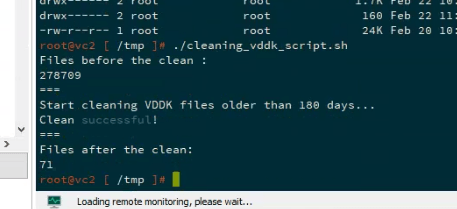
As you can see the script told me that there were more than 278k(!!) files and after cleaning files/requests older 180 days there were only 71 left. From my point of view this had to be the fix for my problem during the vCenter Upgrade process and I went for a second try… it finaly worked without any further problems or errors.
In the end this was the reason the first attempt failed with an error I never hab before and hopefully never ever have again 🙂
 virtual graveyard
Hinterlasse einen Kommentar