Integrating DUO with Workspace ONE AccessIntegrating DUO with Workspace ONE AccessWorkspace ONE Access now offers a native integration with DUO. This integration will not require the use of radius and/or the Workspace ONE Access connector. This blog will outline the steps to setup and configure DUO and Workspace ONE Access.VMware Social Media Advocacy
VMware
Connect VDI users to VMware Horizon with Azure…
Connect VDI users to VMware Horizon with Azure VMware Solution and VMware SD-WANConnect VDI users to VMware Horizon with Azure...As enterprises look to accelerate the pace of digital workspace transformation the need for users to connect to their applications from anywhere using any device has become critical. To help enterprise IT achieve this goal VMware... Continue Reading →
Guest Post: Maximize SD-WAN Performance with…
Guest Post: Maximize SD-WAN Performance with Dynamic Multipath OptimizationGuest Post: Maximize SD-WAN Performance with...Guest post by Paul Ruelas, GTT Modern enterprises demand optimal performance from their software-defined wide area network (SD-WAN) solution — in real time, at all times — to keep both on-premises and cloud-based applications running smoothly. Even when underlying issues with WAN... Continue Reading →
vSAN 7 Troubleshooting Tools | MysticMarvin
vSAN 7 Troubleshooting Tools | MysticMarvinvSAN 7 Troubleshooting Tools | MysticMarvinThe primary configuration & management point for vSAN is the vCenter client. But sometimes, troubleshooting has to dive deeper so additional tools are needed, how lucky we are, vSAN comes with its own. For this last post of 2020, let’s have a look at vSAN... Continue Reading →
Managing AZ Locality within VMware Cloud on AWS
Managing AZ Locality within VMware Cloud on AWSManaging AZ Locality within VMware Cloud on AWSStretched Clusters are a force multiplier within the VMware Cloud on AWS Service. The ability to resolve AWS Availability with an infrastructure level solution enables mission-critical workloads to move into the AWS cloud without rearchitecting site availability. In a strange turn... Continue Reading →
Tanzu Kubernetes Grid (TKG) Demo Appliance 1.2.1
Tanzu Kubernetes Grid (TKG) Demo Appliance 1.2.1Tanzu Kubernetes Grid (TKG) Demo Appliance 1.2.1Check out the newest release of the Tanzu Kubernetes Grid (TKG) Demo Appliance Fling which includes the following new features: Support for the latest TKG 1.2.1 release Support for TKG Workload Cluster upgrade workflow from Kubernetes v1.18.10 to v1.19.3 Updated embedded Harbor to... Continue Reading →
How to Migrate from vRealize Automation 7.x to…
How to Migrate from vRealize Automation 7.x to 8.2 Today!How to Migrate from vRealize Automation 7.x to...In the case that you’re still using vRealize Automation 7.x, getting overwhelmed by its complex architecture and feeling limited by the same functionalities, I have good news for you! By the end of this blog, you will be familiar... Continue Reading →
VMware has released two vSphere 7 VCAP exams
VMware has released two vSphere 7 VCAP examsVMware has released two vSphere 7 VCAP examsVMware has released the Advanced Design VMware vSphere 7.x (3V0-21.21) exam. This exam tests a candidate's ability to apply design principles to develop a vSphere 7.x conceptual design given a set of customer requirements, determine the functional and non-functional requirements needed... Continue Reading →
How should I migrate VMware virtual machines…
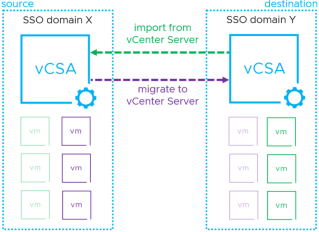
How should I migrate VMware virtual machines between VMware data centres?How should I migrate VMware virtual machines...This is a question I got asked just before I broke for the festive period. In previous posts I've covered how to work around some of the most common issues that I see, providing mechanisms to help with Application... Continue Reading →
VMware vRealize Log Insight 102
VMware vRealize Log Insight 102VMware vRealize Log Insight 102Last time we got vRealize Log Insight (vRLI) up and running. Today we'll look at administration of the platform. The version we are using here is vRLI 8.2. There are three distinct sections in the left hand pane: Management, Integration, and Configuration. Starting at the top, under... Continue Reading →